Category Archives: MAKING THINGS

Boba Fett Cosplay: My First Build for Myself

I have made props for display and costumes for others for a while. I always enjoyed going to comic cons and renaissance faires, but I had never dressed up. I planned on it many times, but something always got in the way. When I watched Season 2 of The Mandalorian, I knew what my first build would be. Boba Fett.

Not the Fett we are looking for

When we first saw Boba’s armor, it looked awesome. I was sold. The only problem, it wasn’t Boba. As we soon found out, it was Cobb Vanth. A few episodes later, Boba shows up draped in black and more vicious than ever. Where Din Djarin was the finesse fighter, Boba was the sledgehammer. Before long he had donned his armor once again and he did not disappoint. I revisited my previous plan and now had my sights set on the REAL Boba. His armor was damaged. Most of the paint had been eaten away by the acid of the Sarlacc pit and whatever events it had been through since we last saw it almost 40 years ago.

The return of Boba Fett and the reuniting of him with his armor.
https://media.comicbook.com/2020/12/star-wars-the-mandalorian-season-2-boba-fett-1248448.jpeg

Boba so fresh and so clean, clean

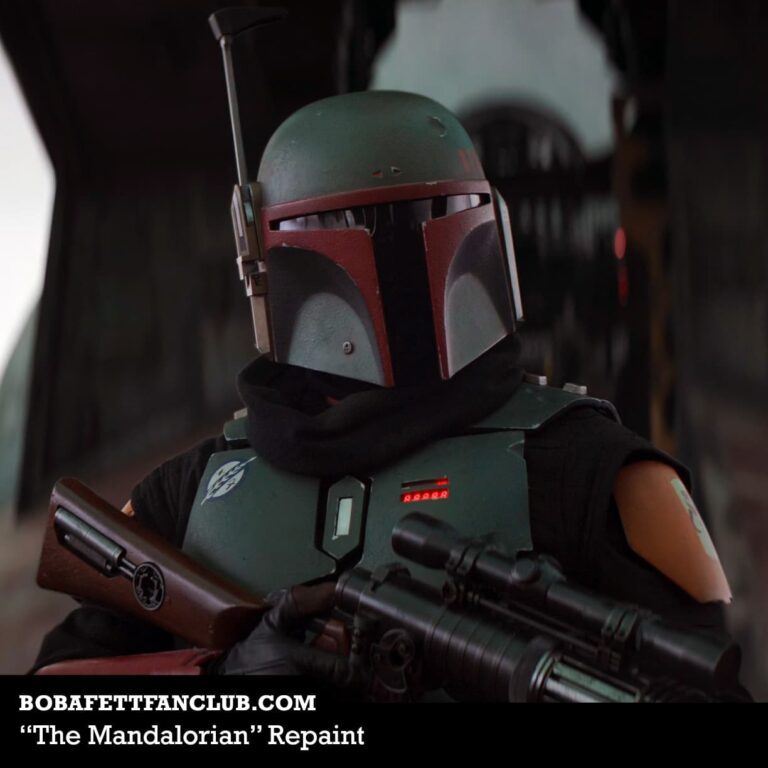
A few weeks later, and another episode comes out. The ramp of Slave 1 is down and we hear Bill Burr rambling as he does from time to time. Boba comes walking down the ramp, flanked by Fennec Shand. His armor is completely repainted and looking amazing. The yellow kill stripes were replaced with red ones. The original grey flak vest, now black and black robe-like garments take the place of the original flight suit. I was blown away.

Boba Fett comes down the ramp of Slave 1 and we get the first glimpse of his new repainted look.
https://www.bobafettfanclub.com/costume/images/variant-themandalorian-repaint.jpg

Each time I had seen him, I thought he looked awesome and there was no way he could look more awesome, but then time after time I was proven wrong. This was it, “Boba Fresh” was to be my first cosplay build.

Setting a goal and getting started

I spent my time doing research on the armor and how it was supposed to look. I watched YouTube videos of scenes from the Mandalorian where the Boba Fett could be seen in action, took screenshots, and hunted down every reference image I could find to help me understand how to make this all come together. My goal, be ready for Comicpalooza 2021 in Houston. Now I can’t tell you how this story ends, because we haven’t made it there yet. I did intend to do my best to document the making of this costume to aid others who want to go down this path in the future, and I still do.

https://youtu.be/l_OCHjazMs4
Not sure how many times I watched this video.

I originally intended to document my process as I did it. I forgot that it about doubles how long it takes to actually do something. With Comicpalooza fast approaching, about 3 weeks away as of the writing of this post, I knew a complete account of the process was not going to happen. I am doing my best to take some photos and make updates on my social media, but an in-depth look at the process, no way.

Turning my failures into your successes

So I have decided it will be a retrospective. I will go back and look at each part of the process and put together guides on sourcing and making each part, compile my lessons learned, and talk through the tough points. I’ll include links to the products I found to work and plan to make videos showcasing and walking through the techniques I used.

I imagine there will be more people looking to recreate this look in the near future especially with The Book of Boba Fett coming out this fall. Hopefully, my series on how I brought him to life will be of assistance to those who decide to go down this same path.

‘Til next time, stay awesome,

Pete

May the fourth gave us the bad batch and I finally got my 3d Printer set up to print their helmets

May the Fourth, international Star Wars Day, came and went. With it, we saw the premiere of Bad Batch. If you have been living in a Sarlac pit, everyone’s favorite group of rejects from the last season of Clone Wars got their own show.

It was a good episode, longer than I expected at around 71 minutes. I will avoid spoilers for the moment, but not for long. I plan to give a synopsis of each episode the week following its airing to give everyone a chance to get caught up.

The original plan was to try and get a full set of the Bad Batch’s signature helmets printed up and finished prior to the debut of the show, but life happens. I did get my brand new Ender 5 Plus set up in a temporary home this week. So instead of my previous plan, I will be printing the helmets and working on them throughout the season. There are 16 episodes planned, so that should be plenty of time to finish all five helmets.

I got some pretty awesome looking files from Galactic Armory. I will reserve judgement until I get them printed, but the first impression are good. He just finished Echo as well. Swing by and check out what he has to offer.

First up is Hunter. It is printing as I write this. I will be posting a guide to how I do the paint and finishing for each helmet. I am also working to provide a time lapse and video guide as well. Those will be found on the Pete Things Youtube channel.

The thought is, pending nothing unforeseen, to have the first helmet finished by next week, so look for an update on that soon. I am super excited about finally being able to show you all what I have been up to. Wrecker will follow and that should be over the following few weeks.

Getting the shops up and running has also been a priority lately. I broke my toe a few months back, so it has slowed down progress. This is the reason for the temporary home for the Ender 5. I just couldn’t put off getting started anymore. It’s not perfect as a professional shop, but things are still progressing!

I am also working on something special. A display inspired by Cara Dune, so stay tuned. Speaking of Marshall Dune, there are also some rumblings that she may be making a return to Disney/Lucasfilms, but we will have to wait and see. NatGeo is going to move ahead with airing the Gina Carano episode of Running Wild and her merchandise is starting to show up on shelves again, so the rumors may have legs.

So, that is what I have been working on. I am trying to keep up with producing content, and that should be easier with the new printer. Hopefully, I can find time in there somewhere to put together the Lego sets I have been sitting on. I have the Razorcrest and Mos Eisley Cantina to put together. I will be doing a build video and a review for both of those as well.

Until next time. Stay awesome!

Pete

Getting back into prop making: printing, prepping, and overcoming some errors

I’m back at making props again. I had a little break from it, but now that I have my 3D printer set up in the temporary workshop (kid’s bedroom), it became easier to get back into! In this blog post, you will see me getting these two blasters from Star Wars The Old Republic ready for sanding and filling. The first step is printing them and I definitely had some issues during the printing process with each of the blasters.

These blaster files are available for free at Mynock’s Den. They are both weapons belonging to characters from the game Star Wars: The Old Republic. The first blaster belongs to Shae Vizla, a bounty hunter in the service of the Sith Empire. The second blaster is one of a pair used by Eleena Maru, love interest of Darth Malgus. He actually killed her because she was his only weakness, but I digress. Anyway, go take a look at the files, and many thanks to Mynock’s Den for making them available.

Shae Vizla blaster assembled to test fit.

Errors and Issues

One of the blasters had quite a bit of shrinkage, which caused the print to pull up from the bed. I adjusted the settings on the second print and the problem was mostly eliminated.

The second blaster had its own set of problems though. About 75% of the way through the print, the filament got bound up and failed to feed. I was checking on the prints pretty regularly, so I caught it fairly quickly. All but two of the objects had completely printed. After some thinking and research, I decided to move the head to the final printed layer and record the Z position. This told me the height of the final printed layer, 64.993 mm.

Moving the print head to the last printed layer position, I was able to notate how far into the print was.

I removed the completed prints and the two partial prints from the bed and releveled the bed. In the slicing software, I put the two models on the bed in the same orientation as they were in the previous print. I moved the models down the same distance as the final Z position of the last printed layer, (63.993 mm) and performed a slice on the x-axis removing the lower part of the model.

I then uploaded the file and printed the parts. After the prints were completed, I acetone welded the second print to the partials from the first attempt. I have to say I am pretty happy with the results. Now I have another technique to help me recover failed prints in the future.

You can see the seams from the acetone welds. The to parts of the print went together pretty well.

The plan is to finish each of these blasters slightly differently. I will be experimenting with a variety of methods to smooth the blasters. This includes using an acetone slurry, vapor smoothing, and sanding by hand or power tool followed up in Bondo and glazing putty at later stages for filling any imperfections that remain after initial prep work is done. My hope is the acetone treatments will reduce the need for Bondo and glazing putty.

The sanding process is generally the most time-consuming part of finishing a print. It’s also where mistakes like cutting too deep into surfaces or gouging out entire sections tend to be made. Uneven pressure or galling on the paper can cause the process to take even longer. The smoother the print and the less visible the layer lines going into the sanding process, the less time this will take.

Another of the main problems with the sanding and filling process is it is very easy to remove details or fill them in with Bondo. The same can be said with acetone. A loss of detail can occur depending on how long the print is exposed. The goal here is to find a happy balance and reduce the finishing time.

Blaster parts straight off the printer. This blaster will be smoothed using vapor smoothing in approximately this configuration.

Stay tuned for the results of my acetone finishing. I will also cover sanding and filling in the next post. These are just test runs to knock the dust off of my making skills and prepare for a big upcoming project.

Bad Batch launches May the fourth. I have purchased the .stl files for the Bad Batch, minus Echo, and would like to try to print and finish all four prior to the launch. I realize this is an unreasonable goal, but a guy can dream. My new Ender 5 Plus is still in the box, so that could be a problem. Anyway, until next time!

Keep making and stay awesome,

Pete

Getting started in 3d printing: 6 tips for a successful print and a look at my Post-process

3D printing has become a very popular hobby in recent years, as the technology has improved and become more affordable. It is not uncommon for people to purchase 3D printers for less than $500 these days, with many models available on the market that will work great for beginners. In this article, I am going to give an overview of my project process for doing props.

Printing

Printing is pretty much a :”set it and forget it type of thing.” Monitoring your print is a good idea in the event there is a failure, but most of the ways you can improve and increase the success rate of you print is in the setup and preprint part of the process. Here are some tips to help.

TIP #1 The right filament

First, it is important to make sure that your printer has the correct filament for the project use. If you are printing something that will be outside or exposed to heat, printing with PLA (Polylactic Acid) is not a great idea unless you reinforce or do some additional steps. ABS (which we will be using) however, has a higher heat resistance and works great for props. All of these tips are with the understanding we will be using ABS.

TIP #2 Plenty of fresh air for you

Good ventilation – safety is always important and there are many things that can happen while printing with ABS, from the material melting down and releasing toxic fumes to it just smelling like burnt plastic.

TIP #3 Less fresh air for your print

Enclosures and draft elimination- Draft elimination is important as it may cause the plastic filament to lift up from your print bed and cause issues with sticking. Enclosures can help eliminate draft as well as maintaining the proper temperature.

TIP #4 Bring the Heat

Proper temp – ABS should be printed at 230°C and your bed temp should be set around 105 to 110.

TIP #5 Go make your bed!

Printing surface – a good, level print bed is important because if it’s not then your part may be off-center or have warping around the edges. Also, ensure to level the bed prior to each print. Tape, hairspray, and acetone slurry can help with bed adhesion if issues arise.

TIP #6 To support or not to support, that is the question

Positioning and supports – positioning the model on the bed can help eliminate the need for supports in many instances. Sometimes the need for supports is unavoidable. Minimizing supports will help reduce your workload in post-processing.

Post-processing

Sanding

Sanding is a good way to finish your print. Starting with sandpaper use should be rough grit (60-80). This will remove the majority of any marks left by support material and other imperfections that may have occurred during printing, such as stringy bridges, unwanted infill layer patterns like honeycomb hexagons which can, or layer lines left from the printing process. Finish it up with a 220 and that should be smooth enough for most prints.

Filling

Acetone slurry, bondo, spot filling puddy, and filler primer will be your friend for the larger imperfections that cannot be dealt with by sanding alone. After you use these, it is back to sanding.

Finishing

This is the fun part! Now that you have finished sanding your project it’s time to give it that straight off-the-screen look.

Painting

Acrylic paints, spray paint (primer and color), lacquer. – Don’t dismiss rattle cans, they can have great results. Warming the can up by putting it in a bucket of warm water prior to painting will help with a smooth coat. Try to pick an area that isn’t overly hot or dirty. Make sure you have a surface protector down and your PPE. Start by laying nice even coats from about 12-16 inches away. Be patient, let the layers dry well before continuing to add additional paint or weathering effects (they’ll peel off).

Weathering

My absolute favorite part. Weathering is a technique used to make objects look old, dirty, and weathered. You can use paint or pastels for this process as well! Graphite powders, black/brown washes, and wax paints like rub-n-buff yield great results.

This is an overview of my process. I will walk you through a more in-depth look at my process with a couple of models I am currently finishing up printing. I will go step by step with pictures and tips. If you want to download the awesome models I will be using (did I mention that they are free?) swing over to Mynock’s Den. He has been gracious enough to provide a couple of blasters and they look awesome. He already has the files laid out, so the only thing required would be to break it up to fit on your bed.

So stay tuned for more updates as they come in! My process is not 100% perfect, but it’s what I have found works best for me so far and I am always striving to perfect it. I’m always looking for new techniques and ways to get better and improve, so if you have a suggestion, leave a comment and let me know how I can keep getting better.

Til next time, keep making and stay awesome,

Pete